#!/usr/bin/tclsh

# This is a comment

puts "Hello World!"

if { 0 } {
  This text is a comment that can
  span multiple lines
}

puts "Strings in TCL
can take multiple lines
withou doing anything special"
TCL is a very veteran language. Along with TK, a graphical toolkit, it was very popular for developing window applications before modern widget libraries (Qt, GTK, FLTK, wxWidgets,…) became popular.
DID YOU KNOW…
TCL is very easy to embed in C programs, and as we mentioned earlier, it was very popular for adding GUIs to simple C programs. The widgets of TK are iconic and easily recognizable.
TCL is an interpreted language that in some ways resembles macro languages due to the way it handles strings.
The extension of TCL programs is usually .tcl.
A quick look at the program shows us how it uses the character
# for comments, does not need an end-of-instruction
indicator, and allows you to group instructions using {}.
It also allows us to define multi-line strings directly.
TCL also uses puts to print simple strings and
automatically adds a carriage return.
The multi-line comment is an example of what we mentioned earlier.
The text within the conditional if block, which will never
be executed because the condition 0 can never be valid, is text that
would cause an error if it were executed, but since it can never be
executed, we can put whatever we want inside those braces that will be
ignored impunemente.
As always with interpreted languages, we give permissions and use the
correct interpreter or she-bang.
$ tclsh hello.tcl
$ chmod +x hello.tcl
$ ./hello.tcl
TCL was created by John Ousterhout in 1988 while working at the University of Berkeley, California. The name comes from the acronym Tool Command Language. TCL was developed as a result of the frustration of programmers creating their own languages to include in other applications.
TCL usually goes hand in hand with its most popular extension known as TK (Toolkit). This extension allows developing graphical interfaces for various operating systems, that is, with a high degree of portability.
The ease of embedding TCL in programs written in C and the power and ease of TK for designing graphical interfaces made this tandem very popular. Especially in those times when writing an application for toolkits like Motiff or Athena was a particularly tedious task.
Nowadays, it is still possible to use TK from other programming languages to easily create graphical interfaces. Tkinter for Python, or the Tk module for Perl or Ruby, allows us to create windows, menus, and buttons very easily from these programming languages.
Although we won’t be using TK in this book as we won’t be writing programs with graphical interfaces, it’s worth taking a quick look at our hello world version in TCL/TK:
#!/usr/bin/wish

# This is a comment
button .boton -text "Hello World!!" -command { destroy . }
pack .boton
This small program generates a window that contains a button with the
label Hola Mundo!!, which, when pressed, executes the
command destroy . which effectively destroys the current
window. The pack instruction adds the button to the main
window. That instruction allows us to add the different elements of the
GUI to the windows offering us quite a lot of control over how to “pack”
everything together.
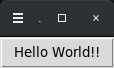
TCL/TK programs use a different interpreter known as
wish as you can see in the SheBang! line at the
beginning of the program.
Summary
- Interpreted language
- Extension:
tcl - Line terminator: Carriage return
- Groups instructions with:
{...} - Multi-line comments: Possible using
if {0} - Single-line comments:
# - String delimiter:
"string"or'string' - You can print text with
puts(Adds carriage return) - Supports multi-line strings
- Does not support
HERE-DOCS - Entry point: Beginning of the file